Before you start
What you need
- Know which game mode or boss condition the run is intended to represent.
- Use the same target assumptions for every build in a direct comparison.
- Treat expected accuracy and core rates as deterministic damage expectations, not sampled miss or core-hit RNG.
01
Set the visible target fields
| Field | What it controls | Default or example |
|---|---|---|
| Boss profile | Selects the encounter's movement and automatic weapon assumptions | Union Shooting Range for new setups |
| Battle duration | How long the scenario generates attacks, skills, and Burst chains | 180 seconds for the Union Shooting Range reference |
| Training Target | Sets Target DEF | 100 DEF |
| Solo Raid | Sets Target DEF | 30,925 DEF |
| Target DEF | The defense value subtracted by the damage model | Editable after choosing a preset |
| Target element | Elemental advantage checks | Independent from the DEF preset |
02
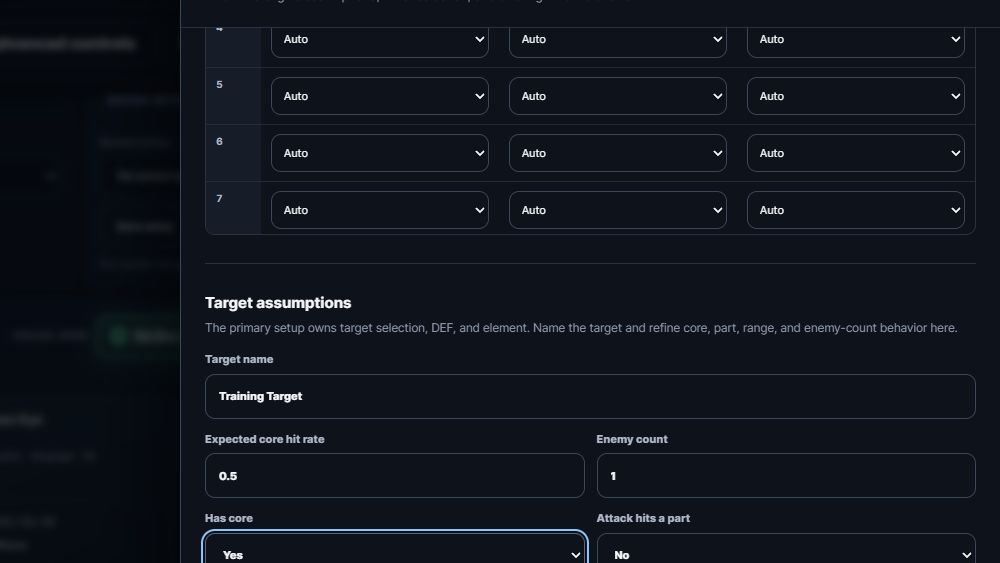
Review advanced target assumptions
Expected core hit rate
Enter a value from 0 to 1. This is a deterministic expected-value fallback, not sampled hit RNG. When a profile can core and the target Has core, precedence is: active mechanic override, profile-forced rate, per-unit manual rate, weapon default, then this target fallback.
Dynamic automatic rates
Some supported mechanics derive accuracy and core-hit rate during battle. Damage Audit shows the resolved rate for each hit and its confidence label. A manual unit override replaces the corresponding automatic rate.
Has core
Set No when the target has no hittable core. The expected core rate does not create a core on a target that lacks one.
Range
Default target in effective range controls the general range assumption. Per-unit manual range overrides in the unit editor can supersede automatic weapon behavior for controlled tests.
Parts and interruption parts
Enable Attack hits a part before marking the part as an interruption part. These settings affect only profiles that use the corresponding damage categories.
Enemy count and boss status
Set Enemy count for effects that scale or target multiple enemies. Boss or final target gates mechanics that explicitly check that status.
Shield and fixed-damage object
Enable these only when the modeled target state requires their dedicated damage behavior.
03
Keep timing and Critical handling intentional
- Tick rate should remain 60 Hz for verified frame conversion. Other rates produce a run warning.
- Expected value is the normal comparison mode for Critical handling. Always and Never are controlled what-if settings, not natural crit-fishing outcomes.
- Automatic gauge is the normal Burst rotation mode. Legacy schedules are retained for scenarios that explicitly require schedule rows.
- Expected weapon accuracy is modeled deterministically. Miss RNG is not sampled across a run.
Final check
Verification checklist
- The Boss profile is correct, and Active assumptions shows the intended duration, target, DEF, element, and Burst mode.
- The target element was checked separately after choosing the DEF preset.
- Has core agrees with Expected core hit rate.
- Range, part, interruption-part, shield, enemy-count, and boss status match the scenario.
- Tick rate remains 60 Hz and Critical handling is intentional.
Troubleshooting
Common mistakes
Damage changes after switching target presets
Likely cause: The preset changed DEF from 100 to 30,925 or vice versa.
Fix: Confirm the selected preset and Target DEF before comparing runs.
Elemental damage looks wrong
Likely cause: The DEF preset was changed, but Target element remained on its previous value.
Fix: Set Target element explicitly; presets do not alter it.
Core damage is missing
Likely cause: The target has no core, the damage profile cannot core, or the resolved profile, unit, weapon, or target rate is zero.
Fix: Check Has core, then review the damage profile and the unit's automatic or manual core assumptions before changing the target fallback.